
Disclosure: this post contains Amazon affiliate links. If you buy through them, we may earn a small commission at no extra cost to you.
The first message that matters after a hurricane is a short one: we are alive, we are here, the house is standing or it is not. Cell service rarely cooperates in the days after landfall, because the sites that survive the wind lose power and their fiber links, and the ones that keep running are swamped by everyone else. A satellite messenger sends that message from a porch or a driveway with open sky, with no tower involved, and keeps sending for as long as the outage lasts.
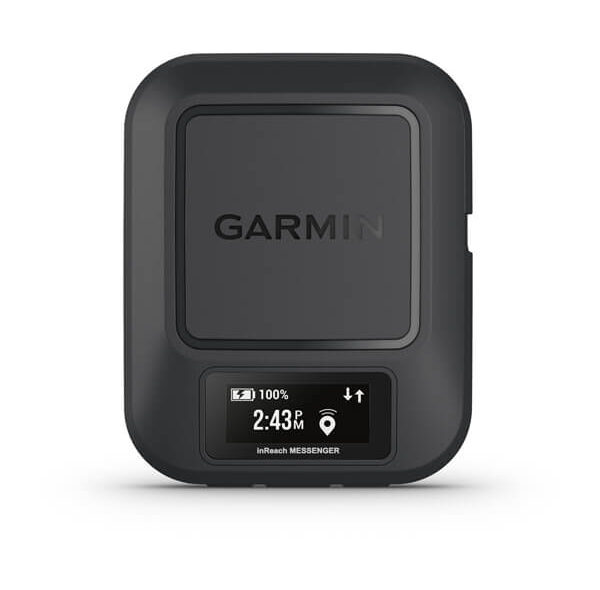
The Garmin inReach Messenger is the communication-first member of Garmin’s inReach line: two-way text messaging over the Iridium satellite network, an SOS button that reaches Garmin’s 24-hour emergency response coordination center, a battery Garmin rates at up to 28 days on default settings, and a reverse-charging mode that can lend a dying phone enough power to send a message. It weighs 4 ounces and is water-rated to IPX7. For how a device like this fits into a layered plan with weather radios and GMRS handhelds, start with our emergency communications guide.
Who It Is For
The inReach Messenger is for the household that wants the simplest path into two-way satellite texting and does not need a navigation device. The inReach Mini 2 adds a compass and waypoints for people who hike; the Messenger keeps a basic TracBack, per Garmin’s manual, and otherwise concentrates on the message. It pairs with a phone through the Garmin Messenger app, so typing happens on a real keyboard, and it still works on its own if the phone is dead, with a small screen and preset or hand-typed messages on the device itself.
On the Gulf Coast the use case is the family communication plan. One adult carries the Messenger. When the convoy leaves ahead of the storm, it sends the twice-daily check-in to the out-of-area contact from the car. When one person stays behind with the house, it is how that person reports in after the eyewall passes, long before a cell tower comes back. And if the water comes up faster than the forecast said, the SOS button reaches a staffed center that relays the location to local responders. Our emergency communications guide walks through the check-in routine the device supports.
Key Specs
| Spec | Garmin inReach Messenger (Garmin figures) |
|---|---|
| Satellite network | Iridium, global coverage |
| Messaging | Two-way text to phone numbers, email and other inReach devices, from the device or the Garmin Messenger app |
| SOS | Interactive SOS to Garmin’s emergency response coordination center, staffed 24 hours a day |
| Battery life | Up to 28 days on default settings |
| Weight | 114 g (4 oz) |
| Dimensions | 7.8 x 6.4 x 2.3 cm (3.1 x 2.5 x 0.9 in) |
| Water rating | IPX7, incidental immersion to 1 m for 30 minutes |
| Phone charging | Safety charging: lends a depleted phone enough charge to send messages through the app |
| App | Garmin Messenger, switching automatically between Wi-Fi, cellular and satellite |
| Works without a phone | Yes, with on-device messaging |
| Charging port | Not published on Garmin’s product page |
| Subscription | Required for satellite messaging and SOS |
Two notes on the table. Garmin publishes the 28-day figure against “default settings” rather than a named tracking interval, so treat it as a best case with a clear sky and infrequent messages. And the pages Garmin keeps for the Messenger do not state the charging port or the display size; Garmin’s own spec sheet for the sibling Mini 2 lists USB-C, and retail listings say the same for the Messenger, but it is not a figure Garmin prints on this product’s page.
What We Like
The network is the first reason to buy it. Iridium covers the whole planet, including the coastal waters and every inland county an evacuation route crosses, so the device does not care whether you are on a bridge or a hundred miles inland in a motel parking lot. Two-way matters just as much: a one-way beacon tells your family you pressed a button, while a two-way messenger lets them reply that they got it, and lets the out-of-area contact pass on a road closure or a shelter address. The Garmin Messenger app carries the same conversation over Wi-Fi and cellular when they exist and over satellite when they do not, so the family uses one app all year instead of learning a new one during a storm.
The SOS is the second reason. Pressing the button sends your location to Garmin’s response coordination center, which is staffed around the clock, and the center can message you back and forth while responders are dispatched. Garmin’s own figure, published when the device launched, was more than 10,000 incidents handled through inReach SOS. That is a different class of help from a beacon that only transmits.
The third reason is the battery and the body. Twenty-eight days on default settings is Garmin’s best-case figure, so the Messenger can sit charged in the kit through a long outage if messages are infrequent and the sky is clear, and the safety-charging mode turns it into a last-resort power source: plug in a phone that has died and it hands over enough charge to send a message through the app. At 4 ounces and IPX7 it rides in a jacket pocket through rain, and its IPX7 rating covers incidental immersion to 1 meter for 30 minutes in clean water, not a soak in debris-filled floodwater.
Limitations
Start with the subscription, because it is the limitation that surprises people. The hardware does nothing over satellite without an active plan, and Garmin’s inReach manuals say that includes the SOS button. Plans can be suspended in the off season, but a messenger that was suspended in May and never reactivated is a paperweight in September. Put the renewal date on the hurricane calendar next to the generator test. We do not quote plan prices here; they change, and Garmin’s site has the current ones.
Then the sky. Every satellite messenger needs a clear view of it. The Messenger will not send from a stairwell, a closet, a car in a parking garage or a room with the shutters up, which is exactly where you are during the eyewall. Its job starts when the wind drops and you can stand outside. It also sends only text: no voice calls, no photos, no web pages. If your family needs a phone call, the IsatPhone 2 is the voice option, and if you need the internet back, that is the Starlink Mini and a power station, not a messenger.
The device itself is small by design, which cuts both ways. The on-device screen and buttons work for a preset check-in or a short typed reply, but anything longer belongs on the phone, so the practical setup is phone plus Messenger, with the device alone as the fallback. There is no map on this model, but Garmin’s manual does list TracBack, which points back to the start of the recorded path, either along it or in a straight line. The Mini 2 adds a compass and waypoints. Weather forecasts are available over satellite but incur data or usage charges on the plan, per Garmin’s inReach manuals. And the 28-day battery figure is for default settings; frequent location sends and a constant listening mode shorten it, so charge it the day a watch is issued, not the day of a warning.
Alternatives
The Garmin inReach Mini 2 uses the same Iridium network and the same response center, weighs 3.5 ounces, and adds a compass and waypoints to the TracBack navigation both devices share, for people who also hike or boat; Garmin rates it at up to 14 days at a 10-minute tracking interval with a full sky view. Choose it if you want one device for both the storm and the trail. The SPOT X runs on the Globalstar network, carries a built-in keyboard so it never needs a phone, and SPOT rates it at 240 hours in 10-minute tracking mode; it is heavier at 7 ounces. Our satellite messenger roundup puts all three beside the SPOT Gen4 and the IsatPhone 2 in one table.
Common Questions
Does the inReach Messenger work without a phone?
Yes. It has its own screen and buttons, sends preset or typed messages on its own, and the SOS button is on the device. The phone and the Garmin Messenger app make typing faster and let the family see the same conversation, but they are not required for the device to reach the satellite.
Do I need a subscription for the SOS button?
Yes. Garmin’s inReach manuals state that an active satellite subscription is required before the SOS function can be used. Keep the plan active through hurricane season; if you suspend it in the off season, reactivate it and send a test message before June 1 rather than waiting for a watch, and confirm it is active before relying on the SOS.
Can it really charge my phone?
Partly. Garmin’s safety-charging feature is meant to give a dead phone enough charge to send messages through the app, not to refill it. Think of it as a few minutes of phone life to get the check-in out, with a real power bank in the kit for everything else. Our power outage checklist covers keeping the messenger and the phone charged through a long outage.
Bottom Line
The Garmin inReach Messenger is the satellite messenger to buy when the job is the family check-in and the SOS, not navigation: global Iridium coverage, two-way texting that works with or without a phone, a 24-hour response center behind the SOS button, and a battery rated for the whole outage. Keep the subscription active through the season and it is the most dependable link in the plan.
Updated 2026-11-01: corrected the TracBack description; Garmin’s manual lists TracBack on the inReach Messenger.
Some links on this page are Amazon affiliate links. If you buy through them, Ultimate Prepper’s Guide may earn a small commission at no extra cost to you.


